MNIMIZE Studio

Build the MLO you want. Skip Blender.

Build it inside an existing GTA V building: draw your rooms, add props and export a FiveM resource. Doors, collision, portals and audio occlusion are handled for you.

  • Ready to ensure, nothing to convert
  • Audio occlusion in every export
  • Walls and floors players restyle in game
  • Adds audio occlusion to MLOs you already own
MNIMIZE Studio
MNIMIZE Studio with a storage facility of 35 units drawn inside a GTA V building
43 doors and openings · portals generated
Collision · concrete, plaster, steel
Audio occlusion · written for you
Export ready · ensure gronland_lager
Inside the comic book store made in Studio: red floor, stairs with a railing up to the second floor
Comic book store · also made in Studio
RoomsReal doorsWindowsStairsSplit levelsCeiling lightsCollisionPortalsAudio occlusionStorage unitsLabsCustomer desksChangeable surfacesPipesGame props

Chapter 01Why Studio

Make an MLO without building everything in Blender.

I built Studio because making an MLO shouldn’t mean spending hours modelling walls and setting up portals by hand. Here, you draw the layout inside a GTA V building, add the props you want, and let Studio take care of the technical side.

In Blender with Sollumz
  • Model and texture every room yourself
  • Set up the rooms, portals and collision of the MLO
  • Audio occlusion is a job of its own, with its own files
  • Every size of a storage unit is another model to make
  • Letting players restyle a room means entity sets or a texture-swap script of your own
  • Nothing warns you when a prop needs a newer game build than your server runs
In Studio
  • Draw rooms on the building’s floor: walls, floor, ceiling and textures are made for you
  • Rooms, portals and collision come from what you draw, with a GTA material on every surface
  • Audio occlusion is written with every export
  • A storage unit or lab at up to five sizes, with the JSON files a housing script reads
  • Mark the walls, floors and ceilings players can restyle: the swap script comes with the export
  • Check stops a model your server’s game build doesn’t have

You only need Blender to model something of your own, like a custom prop. What Studio exports is an ordinary resource, so it runs next to the MLOs you made or bought.

Chapter 02Made in Studio

Here’s what I’ve built with Studio.

These are two projects I made for my own FiveM server, using existing GTA V buildings. The screenshots are from the actual projects inside Studio.

The comic book store from the inside: red floor, dark walls, ceiling lights and stairs to the second floor
The comic book store from above with the roof cut away: both floors and the stairs
The GTA V building the comic book store is drawn inside, with its billboards
The comic book store's shop window and the stairs
Comic book store

A full shop, across two floors.

I turned an existing GTA V shop into a two-floor comic book store, complete with a side room, stairs, railings and lighting. I built it in Studio without modelling those parts by hand.

  • 4rooms
  • 2floors, joined by stairs
  • 6doors, windows and an archway
The storage facility from above: corridors on two floors with storage units along them
A corridor in the storage facility with garage doors on both sides
Storage units at their biggest size, side by side
The second corridor, with garage doors, pipes and pallets of crates
Storage facility

35 storage units, all in one building.

This one has corridors across two floors and 35 rentable storage units. Every unit has a garage door, and most can be upgraded through four different sizes.

  • 35storage units, each with a garage door
  • 27of them grow through four sizes
  • 2floors of corridors

Storage units

Let players upgrade their storage space.

Turn any room into a storage unit and give it up to five sizes. Players can start small and unlock more space as they upgrade. Studio exports the different sizes, garage doors and a units.json file for your housing script.

  • As many units as the building has room for: this facility has 35
  • Every unit is exported at every size, as models of its own
  • Garage doors on every unit, opened and shut by the housing script
A storage unit at size 1
The same storage unit at size 2
The same storage unit at size 3
The same storage unit at size 4
Size 1 of 4
The comic book store's shop floor as built: red floor and dark walls
The same room with a light oak floor and white plaster walls
The same room with a checker tile floor and red brick walls
The same room with a concrete floor and a different look on each wall: navy, brick and white plaster
As built

Surfaces players can change

Let players change how their rooms look.

Want players to choose their own flooring or wall finishes? Pick which surfaces they can customize and set up the available styles. Your script can switch between them in-game, even while someone is standing in the room. No restart needed.

  • Every wall can be a slot of its own, so one wall can differ from the rest
  • Each look is its own small texture dictionary, loaded only while it’s in use
  • Comes with surfaces.json and a picture of every look for your menu
client.luaexports, from any client script
-- room 2's floor gets look 8
exports['comicbookstore']:SetSurface(2, 'floor', 8)

-- one wall on its own, or every wall of the room
exports['comicbookstore']:SetSurface(2, 'wall2', 6)
exports['comicbookstore']:SetSurface(2, 'walls', 1)

-- a whole room at once; slots left out go back
exports['comicbookstore']:ApplySurfaces({ [2] = { floor = 8, walls = 1, ceiling = 19 } })

-- back to the look it was built with
exports['comicbookstore']:ResetSurfaces({ 2 })
The swap runs on each player’s client: your housing script applies it for everyone near the room.

Chapter 03Using Studio

What you get

Two ways you can use Studio.

New interiors

Build a new interior

Import a building from the game, draw the rooms inside it and export. You get one resource folder, ready to stream:

  • Room models with your textures, and the building minus the faces you removed
  • Collision with a GTA material per surface, so footsteps and bullet hits sound right
  • The MLO: rooms, portals, doors that open, room timecycles
  • Audio occlusion, so sound stays in the room it belongs to
  • Ceiling lights with shadows
  • Walls, floors and ceilings players can change in game, with the script that swaps them
  • fxmanifest.lua and a README with the coordinates to teleport in
MLOs you already have

Improve an existing MLO

Point Studio at a folder of MLO resources, made by you or someone else, escrowed ones too. It reads their .ytyp and .ymap and writes what’s missing into a resource of its own:

  • Audio occlusion: which room hears which, through which doorways
  • Lights for rooms that are dark, warm to cool, at the brightness you pick

The MLO’s own files are never touched. MLOs that already ship their own occlusion are left as they are.

How it works

From an empty building to a working MLO.

  1. 01

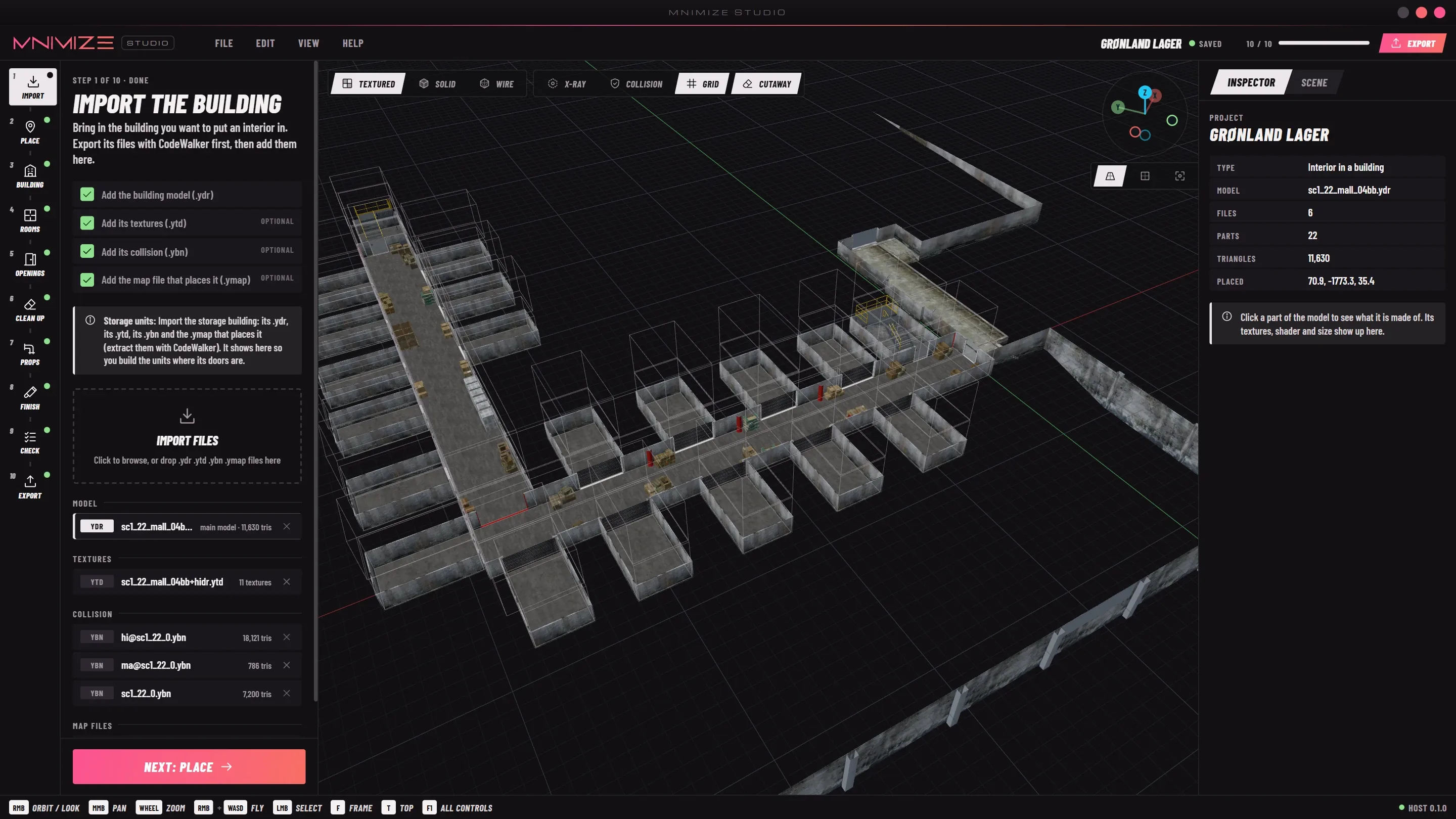
    Import

    Add the building’s model, textures, collision and the .ymap that places it, as CodeWalker exports them.

  2. 02

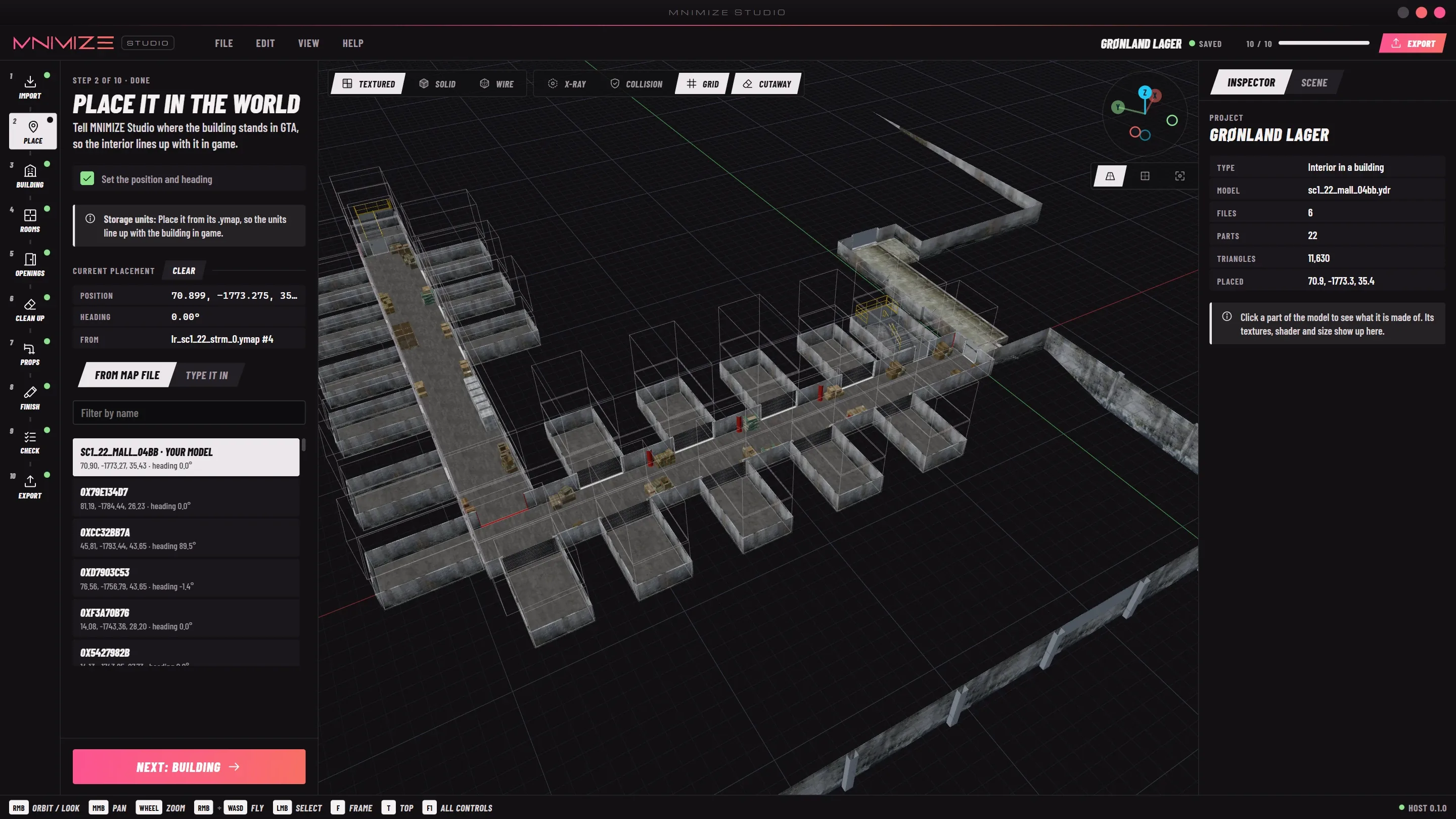
    Place

    The building goes where the map puts it, so the interior lines up in the world.

  3. 03

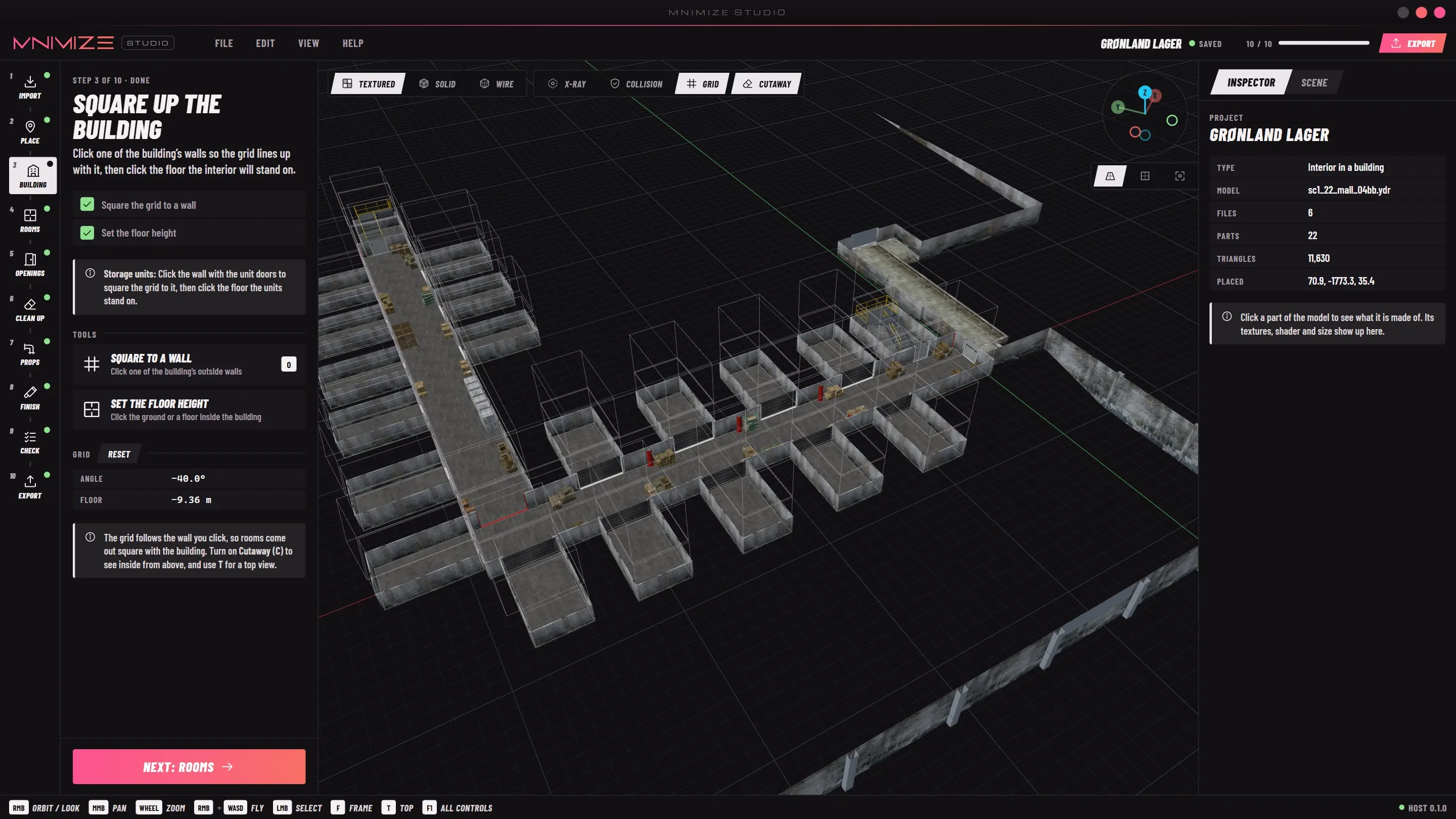
    Building

    Square the grid to a wall and set the floor height. Rooms are drawn on this grid.

  4. 04

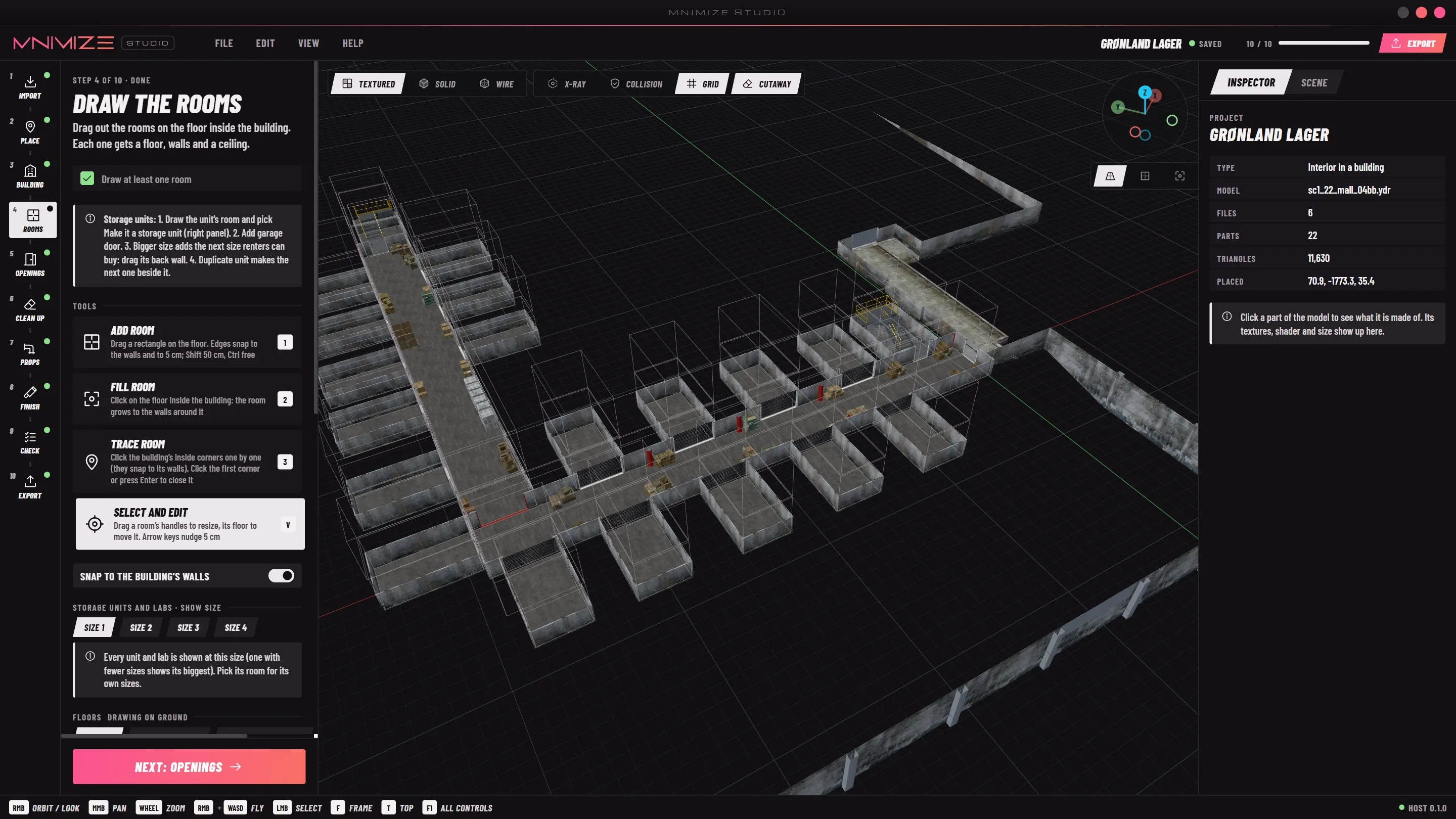
    Rooms

    Drag rooms on the floor. Edges snap to the building’s walls. Floors stack, and split levels get steps.

  5. 05

    Openings

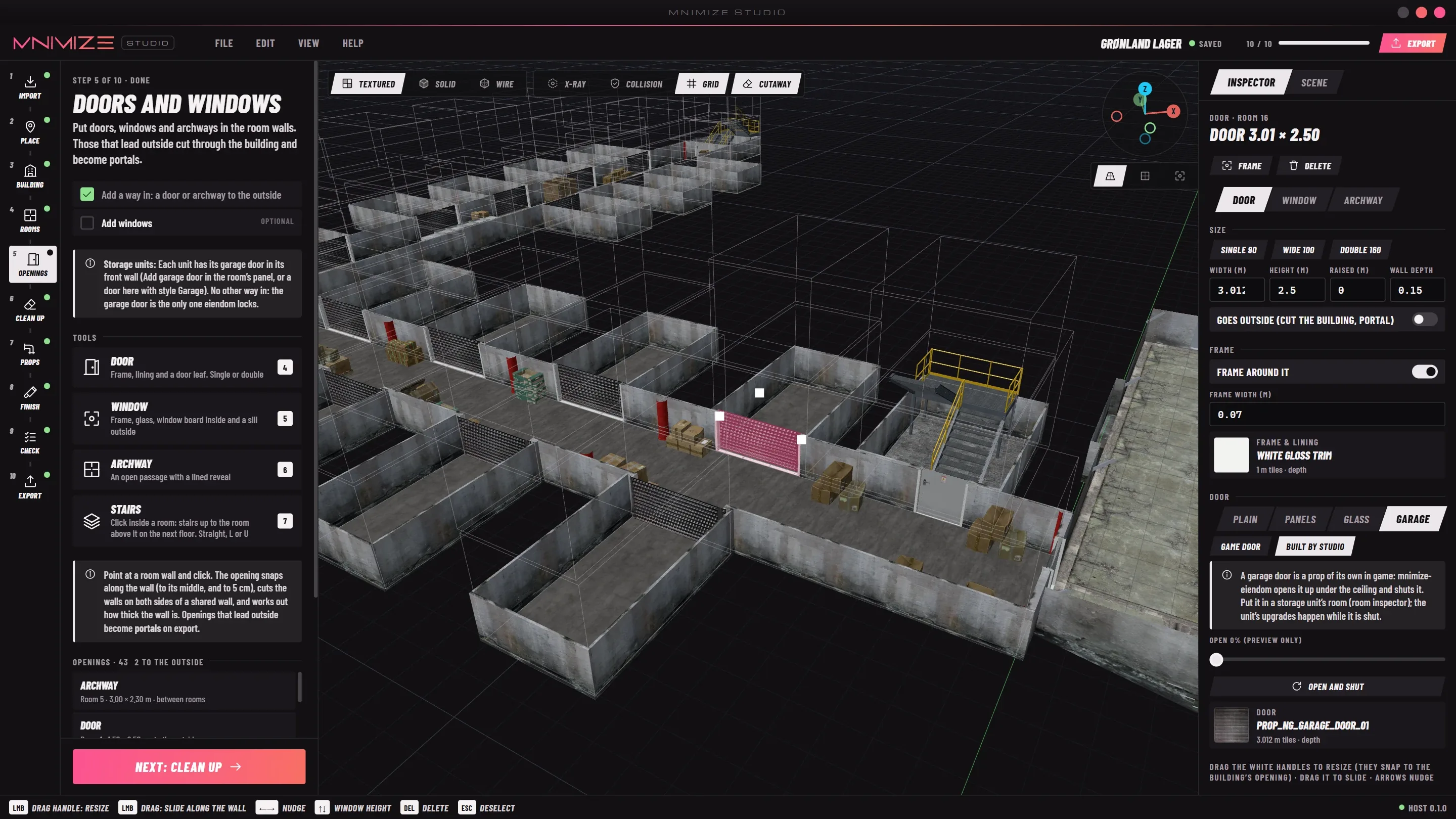
    Doors, windows, archways and garage doors. Use one of the game’s 575 door models, or let Studio build the door.

  6. 06

    Clean up

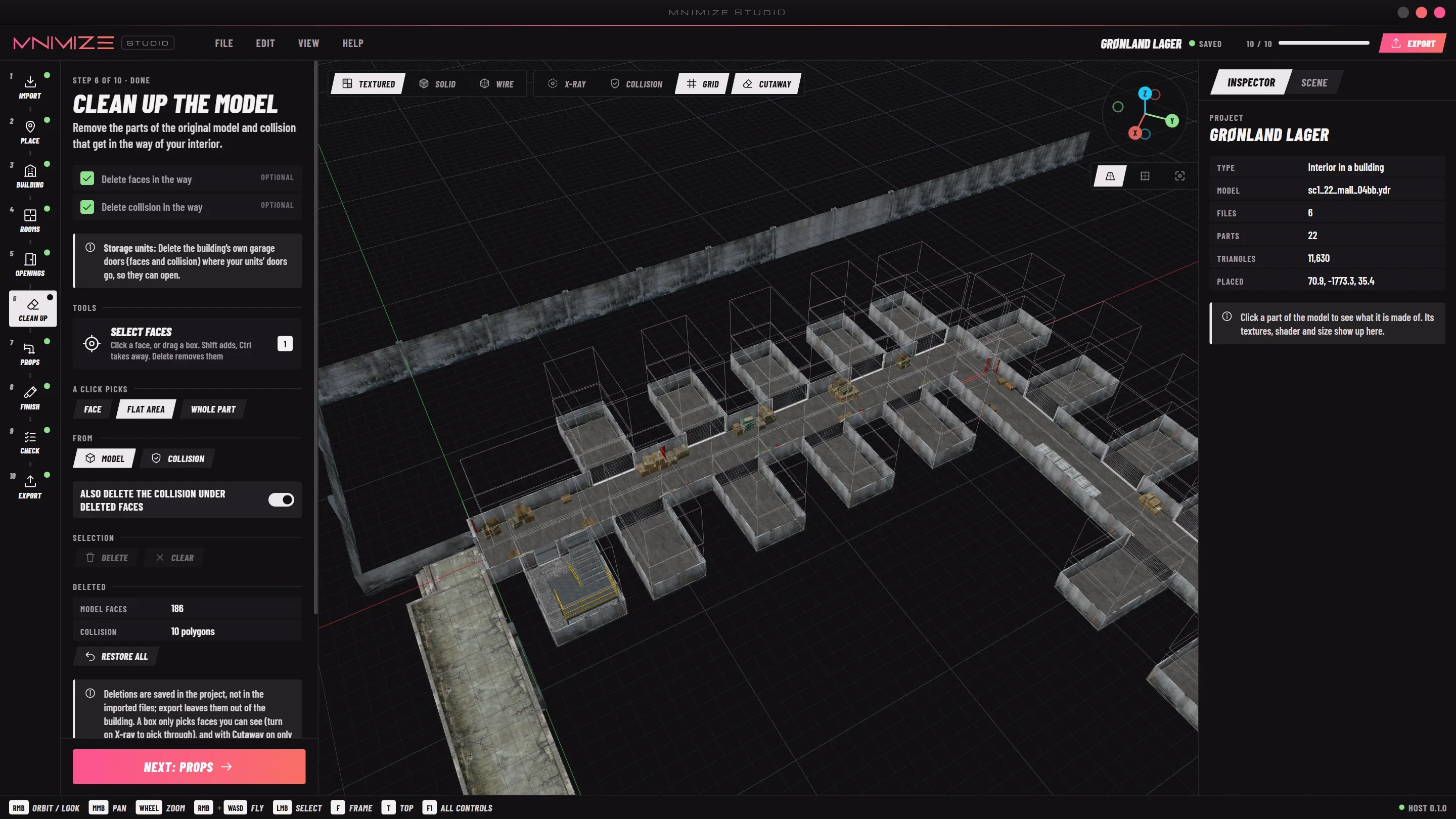
    Delete the faces and collision of the building that would sit inside your rooms or in front of a door.

  7. 07

    Props

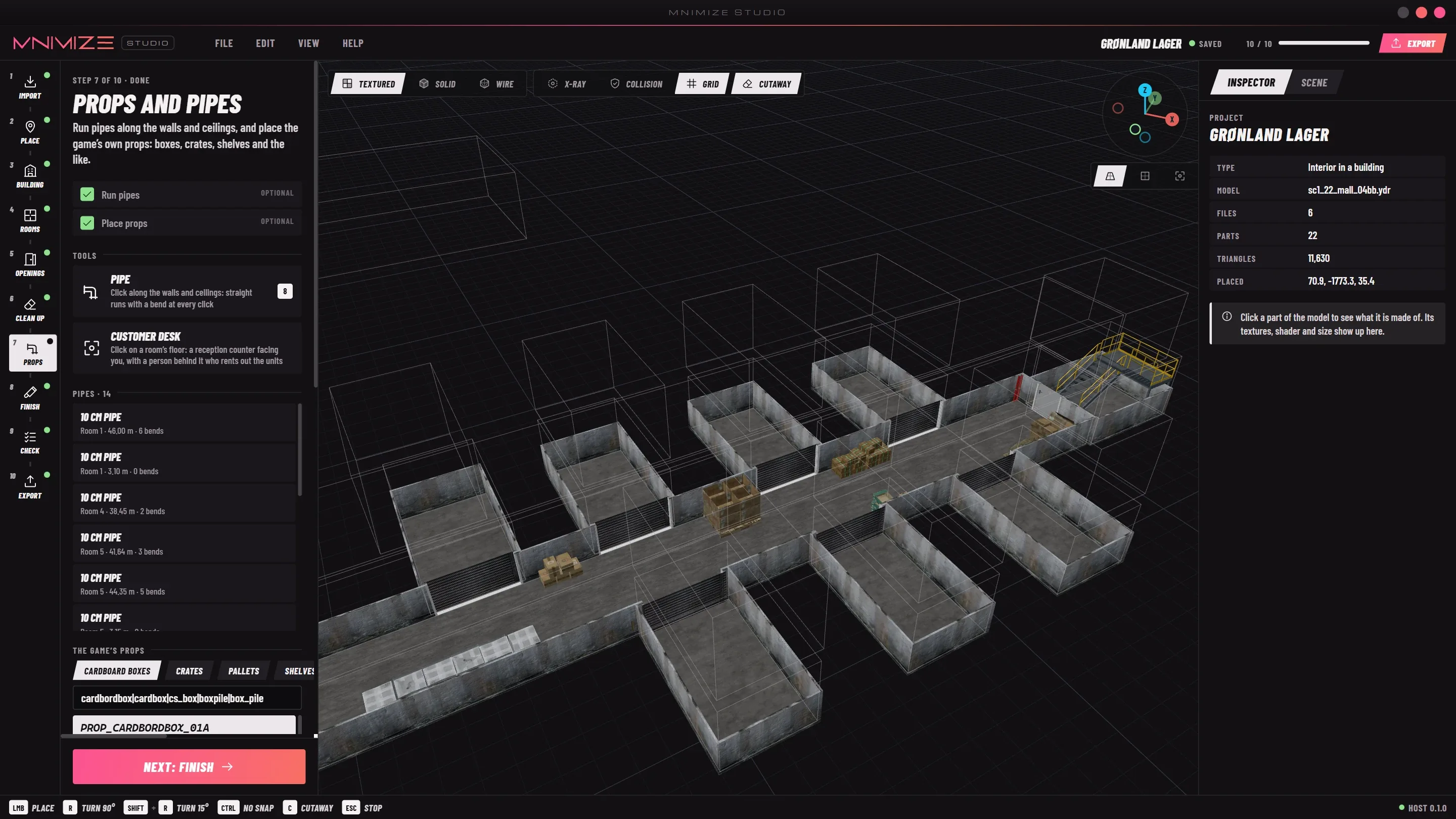
    Place crates, shelves and boxes from the game, run pipes, and set up a customer desk.

  8. 08

    Finish

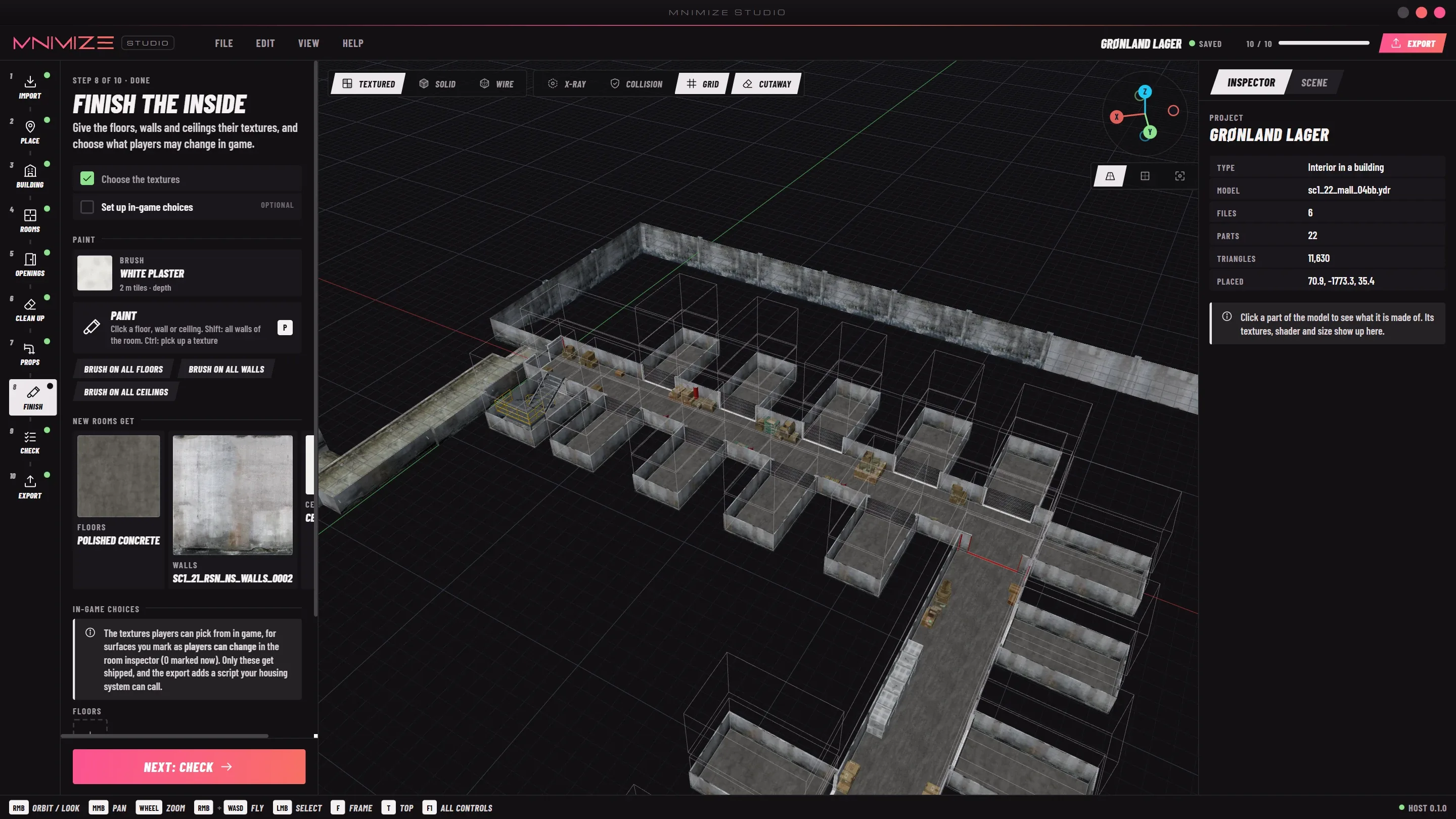
    Textures from the building itself or the photo library, and the looks players can buy in game.

  9. 09

    Check

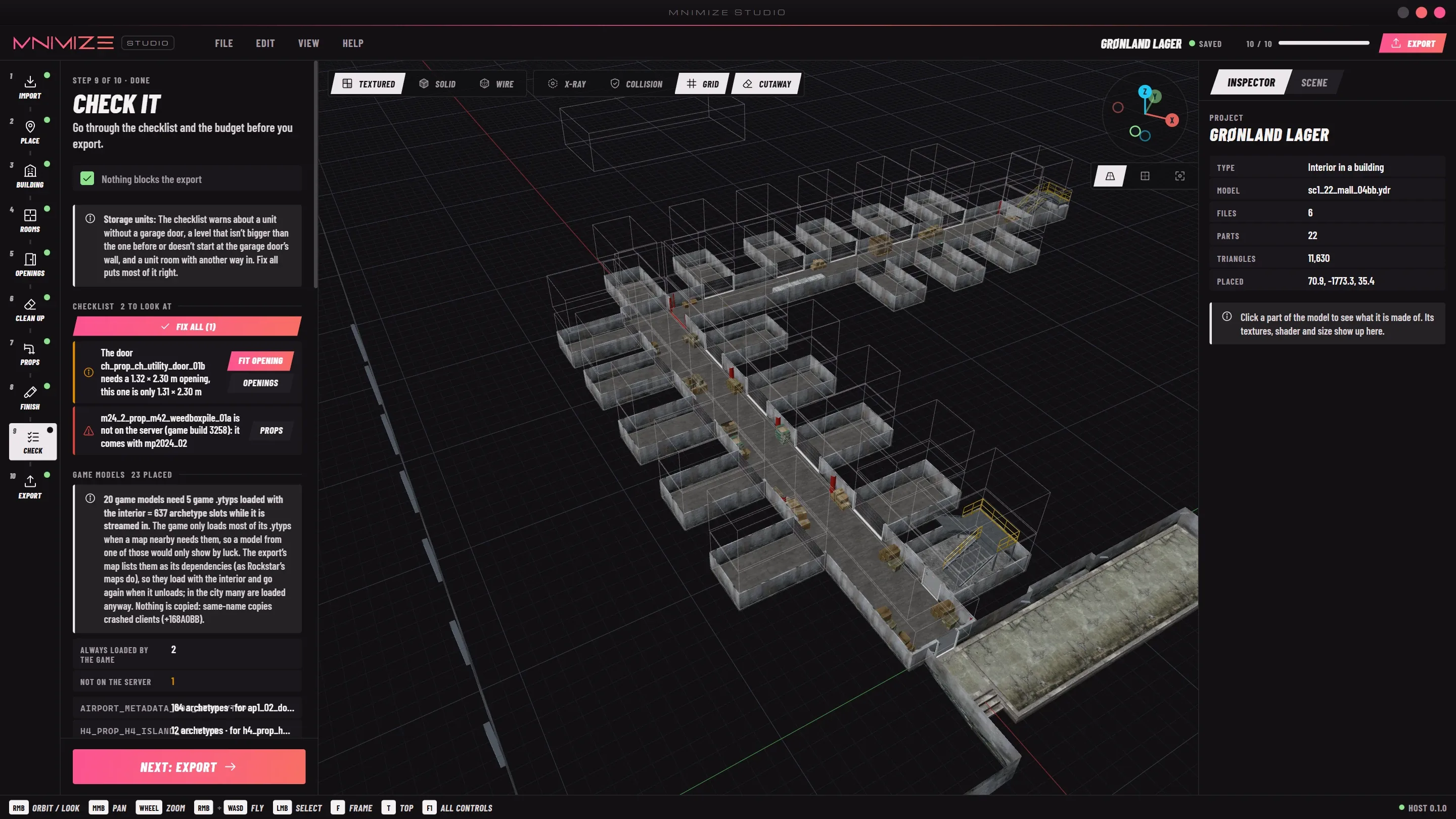
    A checklist with one-click fixes, the game files the export loads, and a budget per room.

  10. 10

    Export

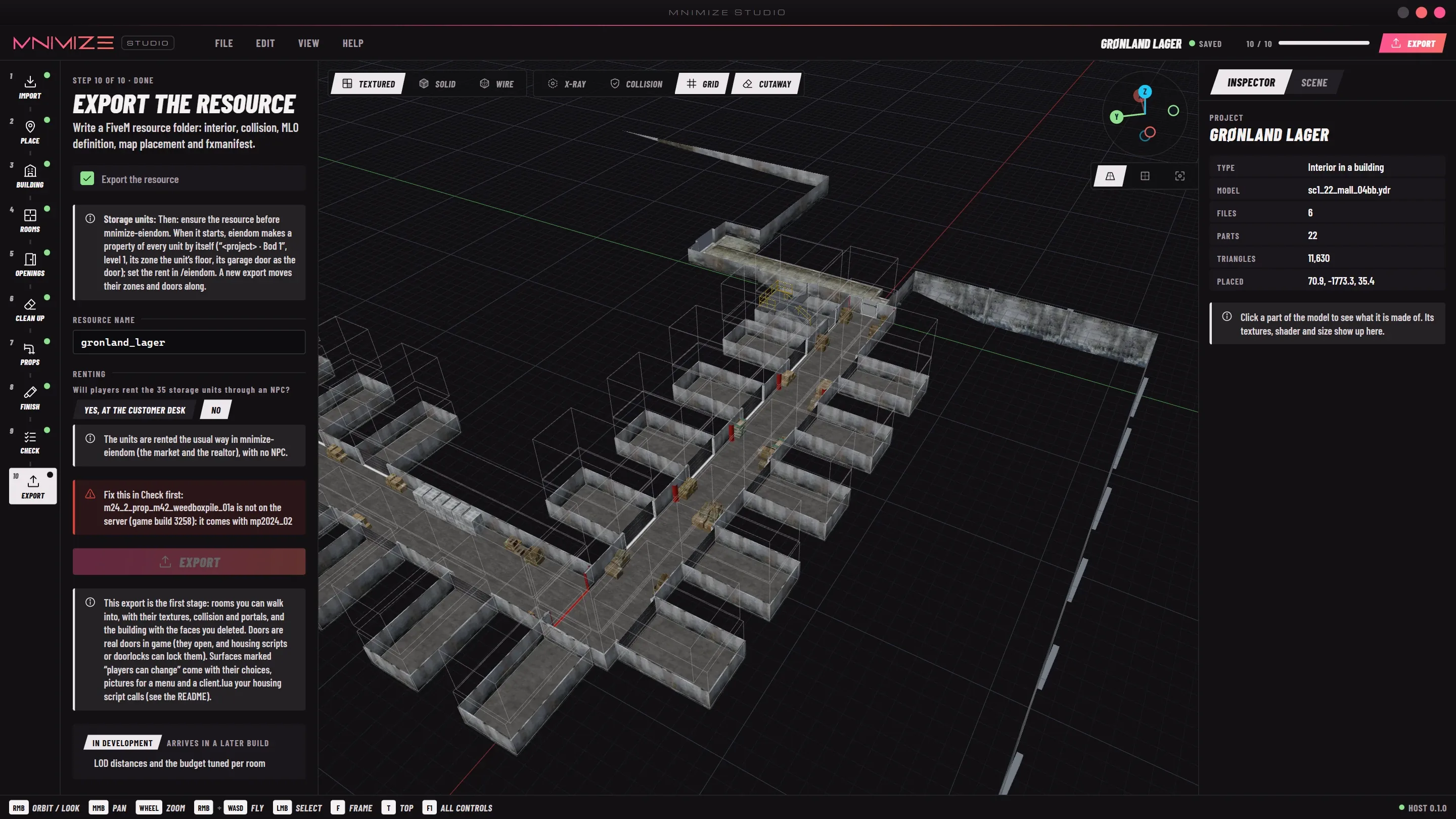
    Writes the resource folder. Copy it to the server, ensure it, reconnect.

Studio's Import step
Studio's Place step
Studio's Building step
Studio's Rooms step
Studio's Openings step with a garage door selected
Studio's Clean up step
Studio's Props step
Studio's Finish step
Studio's Check step
Studio's Export step

Step 1 of 10 · Import · from the storage facility project

Chapter 04The export

Here’s what you get when you export.

This is a real export of my storage facility, with all 35 units. Studio generated all 163 files in one go, coming in at just 8.7 MB. No extra conversion or packing.

gronland_lager/163 files · 8.7 MB
  • fxmanifest.luastreams it, registers the .ytyp and the audio
  • README.mdhow to start it, where to teleport in
  • units.json35 storage units, their sizes and garage doors
  • desks.jsonthe person behind the customer desk
  • audio/
  • gronland_lager_game.dat151.relaudio occlusion: rooms and doorways
  • stream/
  • gronland_lager.ytypthe MLO: 10 rooms, 10 portals, its doors
  • gronland_lager_mlo.ymapplaces it in the world
  • gronland_lager_manifest.ymfwhat loads with it
  • gronland_lager_col.ybncollision, one material per surface
  • 3217756545.ymtaudio occlusion paths
  • gronland_lager_room1…10.ydrthe rooms
  • gronland_lager_lights1…8.ydrceiling lights with shadows
  • gronland_lager_gdoor*.ydr ×15garage door panels
  • gronland_lager_u*l*.ydr ×116each unit at each size
  • gronland_lager_txd.ytdtextures
  • sc1_22_mall_04bb.ydrthe building, minus the faces you removed
fxmanifest.luaas written
-- Made with MNIMIZE Studio
fx_version 'cerulean'
game 'gta5'

this_is_a_map 'yes'

data_file 'DLC_ITYP_REQUEST' 'stream/gronland_lager.ytyp'

file 'audio/gronland_lager_game.dat151.rel'
data_file 'AUDIO_GAMEDATA' 'audio/gronland_lager_game.dat'

mnimize_units 'units.json'

mnimize_desks 'desks.json'

files {
    'units.json',
    'desks.json',
}
server.cfg
ensure gronland_lager
163files in that one export, 8.7 MB in all
116unit models, every unit at every size, made by Studio
35storage units in the facility today, each with a garage door
575game door models to choose from
A storage corridor drawn in Studio: garage doors on both sides, red pipes and crates from the game

Chapter 05Why it exists

I built this because I needed it myself.

Studio started because I wanted to build more ambitious interiors for my own FiveM server without doing everything manually. I needed storage units that could grow, labs that only loaded when needed, and working reception areas. Instead of building each one from scratch, I started making the tool I wished I had. Everything you see here comes from projects I’ve actually built with it.

Chapter 06Changelog

Recent changes.

Studio updates itself when it starts, so these reach you without reinstalling.

    • Rooms on split levels: a door between floors at different heights gets steps by itself
    • Customer desks, with a person behind them who rents out the storage units
    • Labs that grow like storage units and only spawn while their door is open
    • New doors keep clear of the doors and garage doors already in a wall
    • Studio updates itself
    • Game models load with the interior, so a door or prop never depends on luck to show up
    • Check stops an export that uses models from DLCs newer than the server’s game build
    • Storage units with garage doors and sizes renters can buy
    • Doors that open in game, built by Studio or any of the game’s door models
    • Ceiling lights with shadows, collision materials, stairs, floors and traced rooms
    • Walls and floors players can change in game
    • Exports about a third of their old size

Chapter 07Pricing

Pay once, or subscribe.

Studio comes as a one-time purchase or a monthly subscription. The price is announced when it opens.

MNIMIZE Studio

Build MLOs without Blender

The full Studio, including the tools for existing MLOs, with unlimited projects and exports.

One-timePay oncePrice at launch
MonthlySubscription, cancel any timePrice at launch
Tell me when it opens →

Studio runs on Windows 10 and 11 (64-bit) and needs GTA V on the same PC: it reads the game’s own files, so nothing from Rockstar is shipped with it.

FAQ

A few things you might want to know.

Do I still need Blender?

Not to build an MLO. Rooms, portals, collision, doors, lights and props from the whole game are all done in Studio. You only need Blender with Sollumz if you want to model something of your own, like a custom prop or an unusual shape. Studio’s export is an ordinary resource, so it runs next to the MLOs you made or bought.

What do I need to run Studio?

A Windows 10 or 11 PC (64-bit) with GTA V installed. Studio finds the game by itself and reads doors, props and textures straight from its files. Buildings are imported from the files CodeWalker exports.

Do I need anything else to make it work on my server?

No. The export is an ordinary resource with everything in it, audio occlusion included. Copy the folder into your resources, add ensure and restart. Its README has the coordinates to teleport in.

Can I add audio occlusion to an MLO I bought?

Yes, escrowed ones too. Studio reads the MLO’s .ytyp and .ymap, works out which room hears which through which doorways, and writes it to a resource of its own. The MLO itself isn’t changed. It can add ceiling lights to dark rooms the same way.

Will it work on my server’s game build?

Studio checks every game model you place against the game build it targets and won’t export one that only newer DLCs have, so nothing turns up invisible in game.

Does it work with my housing script?

The interior is a standard MLO, so door, target and housing scripts see it like any other. Storage units, labs and customer desks come with JSON files a housing script reads, and surfaces players can change come with a client.lua whose exports any script can call.

How do updates work?

Studio checks for a new version every time it starts, downloads it in the background and installs it when you restart. Your projects stay where they are.

Is this made by Rockstar or Cfx.re?

No. MNIMIZE Studio is an independent tool and isn’t affiliated with Rockstar Games, Take-Two Interactive or Cfx.re.

Ready to build your next interior?